Play Chess Against the Computer - Free & No Download
ChessDada lets you play chess vs the computer instantly in your browser - no app, no sign-up, completely free. The bot is powered by Stockfish, one of the strongest chess engines in the world, with three difficulty levels so beginners and experienced players both get a fair, fun game. If you miss the old Yahoo Chess days, this is the relaxed, no-fuss way to enjoy a quick game any time.
How to Play Chess vs the Computer
- Pick a difficulty: Easy, Medium, or Hard.
- Choose your colour - play as White or Black.
- Tap a piece to see its legal moves, then tap a highlighted square to move it.
- The computer replies automatically. Press New Game to start again any time.
Easy, Medium & Hard Difficulty
Each level changes how deeply the engine thinks, so you can improve at your own pace:
- Easy - perfect for new players learning the rules and basic tactics.
- Medium - a solid challenge for casual and improving players.
- Hard - full-strength Stockfish for a serious test of your skills.
Which Difficulty Should You Actually Choose?
Most players tap Hard on their first visit, lose thirty games in a row and learn almost nothing. That is not a lack of talent - it is a feedback problem. When the engine is far stronger than you, every game is lost for a different reason, so no pattern ever repeats and nothing sticks.
Use this rule instead: start one level below where you think you belong. Win three games comfortably, then move up one step. If you start losing most games at the new level, drop back down. Nobody is watching, and there is no prize for playing Hard.
A comfortable win means all three of these were true: you never hung a piece, you always knew roughly what your plan was, and you converted the ending without panic. If you won only because the engine gave material away - Easy does that - the game does not count towards your three.
Not sure where you stand in the first place? Our guide to what counts as a good chess rating explains the usual bands.
| Level | Best for | Engine setting | Move up when |
|---|---|---|---|
| Easy | Brand-new players still learning how the pieces move and what a blunder looks like. | Skill level 3, about 0.3 seconds of thinking per move. | You win three games in a row without hanging a piece. |
| Medium | Casual and improving players who already see one-move threats. | Skill level 10, about 0.7 seconds per move. | You win two games out of three and can explain how you won. |
| Hard | Strong club players who want a genuine test, or anyone checking a specific position. | Skill level 20 - this build at full strength - about 1.2 seconds per move. | This is the top level. Stay here and study the losses. |
The skill values and thinking times above are the real settings this page sends to the engine, not estimates.
How to Practise Against the Computer: Three Drills
Playing random games against a bot is entertainment. These three drills are practice - they are boring on purpose, and they are the reason some players improve quickly against an engine while others just collect losses.
Drill 1 - Opening repetition: the same opening ten times
Pick one opening and play the same first eight moves ten games in a row, on Easy. Not ten different openings once each - one opening ten times.
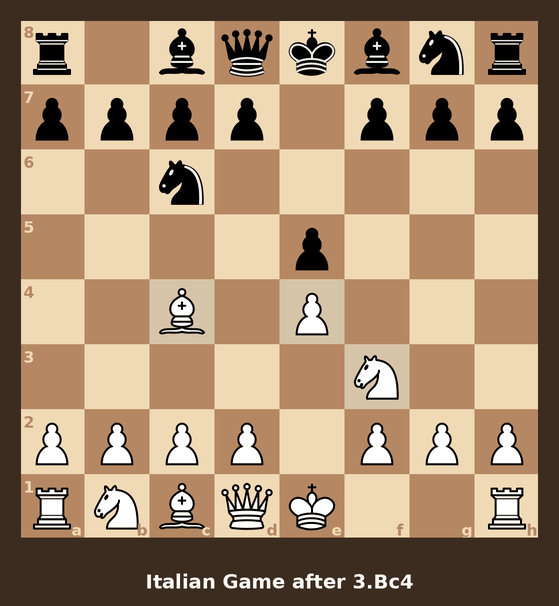
The goal is not to win those games. The goal is to stop thinking about moves one to eight altogether, so that all of your attention and clock arrive at the middlegame intact. By game six or seven your hand starts moving before your brain does, and that is exactly the point. If you are still choosing an opening, the best chess openings for beginners is the place to start.
Repetition also teaches you what happens when the opponent deviates, because sooner or later the engine will. When it does, you will notice immediately - the position simply looks wrong, and that feeling is worth more than any memorised line. To see how early deviations get punished, our 47 opening traps with videos walks through each line move by move.
Drill 2 - Endgame drills: king and pawn versus king
This is the drill almost nobody does, and it is the one that wins the most games. Every game on this page starts from the standard position, so the way to drill an ending here is to steer into it: play on Easy and trade pieces off deliberately, even trades that are not objectively best, until only kings and pawns are left. Then play it out properly.
Why the computer is the right partner for this: it defends perfectly. A human opponent will let you get away with a sloppy king move in a king-and-pawn ending. Stockfish never will - if the win requires the opposition and you take it one move too late, the win is simply gone, and it will show you so. That is unforgiving, and it is precisely the feedback you need.
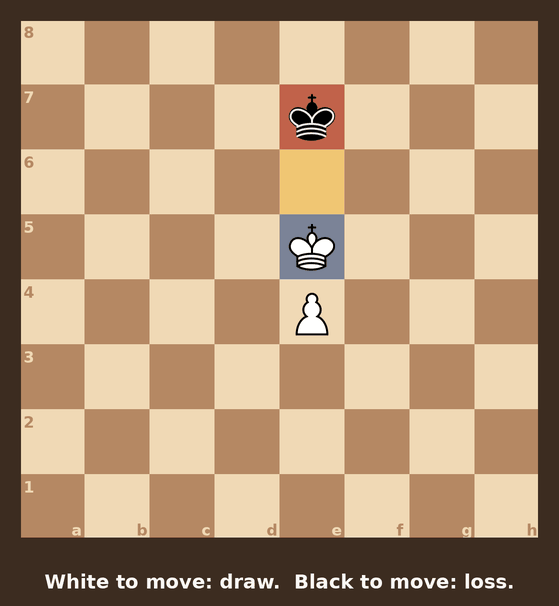
King and pawn versus king is the first ending to own outright. It is the foundation of almost every other pawn endgame, and it turns on a single idea - the opposition - which takes one afternoon to learn and pays out for the rest of your chess life.
Drill 3 - Rescuing a lost position
Nobody practises defence. Everybody needs it.
The next time you are two pawns down against Medium, do not press New Game. Play it out to the end. Look for the perpetual check, the stalemate trick, the fortress, the endgame where the wrong-coloured bishop saves you. You will lose most of these positions - they are lost - but the ones you save will be the games you remember, and the habit of looking for a resource instead of resigning transfers straight into your games against people.
Our endgame saves studio collects positions where a lost game was rescued, if you want to see what to aim for. For sharpening the tactical eye that spots those resources, the daily chess puzzles are the shorter daily version of the same work.
Why Play Chess vs a Computer?
- Practice any time, without waiting for an opponent.
- Learn openings, tactics and endgames at your own speed.
- Warm up before playing real people in the ChessDada lobby.
- Enjoy a calm, simple, Yahoo-Chess-style experience.
Computer vs a Real Human - Which Is Better?
Honestly: both, for different jobs. The engine is a training partner, not a replacement for opponents. It is available at three in the morning, it never gloats and it never disconnects - but it also never gets nervous, and learning to think clearly while you are nervous is a large part of what chess strength actually is.
The practical answer is to use the computer for repetition and the lobby for the real thing. Drill an opening here until it is automatic, then go and play it against a human in the ChessDada lobby where the result counts.
| What matters | Computer (this page) | Real opponent (lobby) |
|---|---|---|
| Availability | Instant, any hour, always ready. | Usually a few seconds' wait for a table. |
| Strength | Exactly the same every game - you choose it. | Varies; you meet people above and below you. |
| Nerves and pressure | None. Nothing is at stake. | Real. This is the skill that only humans teach. |
| Taking a move back | Yes - the Undo button. | No. Mistakes are permanent, so they stick. |
| Rating | No rating is kept. | Your Elo moves after every game. |
| Best for | Repetition, endgame drills, testing an idea. | Genuine practice, and the reason to improve at all. |
What Is Stockfish?
Stockfish is a free, open-source chess engine released under the GNU General Public License v3. It has been developed in the open since 2008 by a large community of contributors and has spent most of the last decade at or near the top of the recognised engine competitions, TCEC and the Chess.com Computer Chess Championship. It is the engine behind the analysis boards on most major chess sites.
The version on this page is a compact WebAssembly build, chosen deliberately: it is small enough to download in a second on a phone connection, which matters far more here than the last hundred points of engine strength. Even so, at Hard it plays well above club level.
One consequence worth knowing: the engine runs inside your own browser. Your moves are calculated on your device and are never sent to our server or anywhere else. That is also why the first move can take a moment on a slow connection - the engine is still loading - and why you can keep playing offline once the page has loaded.
Five Mistakes People Make Against an Engine
- Living on the Undo button. One takeback to see what you missed is study. Five takebacks until the move works is a way of never finding out whether you would have seen it. Decide before you move, then live with it.
- Only ever playing Hard. Losing is not the same as learning. If you cannot say why you lost, the level is too high - see choosing a difficulty above.
- Pressing New Game the moment the position turns bad. The lost middlegame and the difficult ending are the parts of the game you have practised least, so quitting there guarantees they stay your weakest parts.
- Waiting for the engine to blunder. It will not, except on Easy where it is told to. Against Medium and Hard you have to build an advantage - grab space, improve your worst piece, create a weakness and go after it. There is no trick.
- Never reviewing the loss. Before starting the next game, find the one move where it actually went wrong. It is usually a hanging piece or a missed tactic, which is why a run through pins, forks and skewers pays for itself faster than any opening study. Our ten practical tips for beginners cover the rest.
ChessDada: The Free Yahoo Chess Revival
ChessDada brings back the friendly, simple online chess that so many players loved on Yahoo Chess. Ready for a real opponent? Play a live game against people around the world in the multiplayer lobby, or read tips on the ChessDada blog. New to the game? Start with our how to play chess for beginners guide.
Share on WhatsApp Play vs Humans
Frequently Asked Questions
Is playing chess vs the computer free?
Yes. Playing against the ChessDada computer is 100% free, with no download and no sign-up required.
Do I need to install anything?
No. The game runs entirely in your web browser on desktop and mobile - just open the page and play.
Which chess engine does ChessDada use?
The computer is powered by Stockfish, a free, open-source engine and one of the strongest in the world.
Can I play chess vs computer on my phone?
Yes. The board is fully responsive and works in Android and iPhone browsers - no app store needed.
Can I play against real people too?
Yes. Visit the ChessDada lobby to play live multiplayer chess against humans, just like the classic Yahoo Chess rooms.
How strong is the computer?
You choose Easy, Medium or Hard. Hard uses full-strength Stockfish, while Easy and Medium are tuned to be beatable as you learn and improve.
Can I take back a move against the computer?
Yes. The Undo Move button takes back your move together with the computer's reply, so you are returned to your own turn. Use it to see what you missed - but decide your move before you play it, otherwise you never find out whether you would have found it on your own.
How do I get better at beating the computer?
Drop down one difficulty level, then practise instead of just playing: repeat one opening for ten games, steer games into a king-and-pawn ending and play it out, and finish the positions you are losing rather than starting a new game. Before each new game, find the single move where the last one went wrong.